Learning Horizon | For Learners

ASP.NET, SQL SERVER, JQUERY,JAVASCRIPT, WEBSPHERE

Showing posts with label Interview Question. Show all posts

Saturday, 11 February 2017

Difference Between ToString() and Convert.ToString()

This article is about the Difference Between ToString and Convert.ToString Method in C#.

ToString and Convert.ToString Method in C#

Both methods have the ability to convert a value to a string. The main difference between the two methods is that ToString() method can’t handle Null values, so if you use this method, you will experience a Null Reference Exception in your code at some point in time (as shown below Example). On the other hand Convert.ToString() method can handle Null values. So, as a good coding practice and to be on the safe side, experts recommend always use Convert.ToString() method.

We have used below mentioned examples to demonstrate the difference between ToString and Convert.ToString methods.

.ToString() Example:

In C#, if you declare a string variable and do not assign any value to the variable, the variable takes a null value by default. In this case, if you use the ToString() method, the program will raise a null reference exception.


 using System;

namespace DemoToString
{
    public class Program
    {
        static void Main(string[] args)
        {
            Object objStr = null;
            //Below line will throw NullReference Exception
            //Because .ToString() can't handle Null values
            string val = objStr.ToString(); 
            Console.WriteLine(val);
            Console.ReadLine();
        }
    }
}
tostring-and-convert-tostring

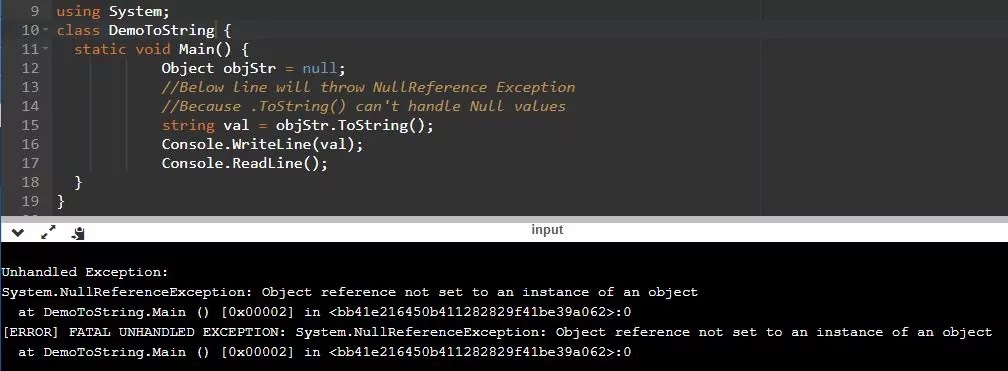
When we run the program it will give us null reference exception because the ToString() method in C# expects that the object cannot be NULL when called on it. In our example, the object objStr is Null, and we call ToString() on the NULL object, so it gives a NULL Reference exception.

Convert.ToString() Example:

Let's see what happens when we utilize the Convert.Tostring() method in the above example. Now, after making the changes, run the program, and it should execute correctly. So to put it plainly, the Convert.ToString() method handles null, and the ToString() method does not deal with Null and tosses an exception.


using System;

namespace DemoConvertToString
{
    public class Program
    {
        static void Main(string[] args)
        {
            Object objStr = null;
            //Below line will Return Null Or Blank
            string val = Convert.ToString(objStr);
            Console.WriteLine(val);
            Console.ReadLine();
        }
    }
}

Convert is a static class in the .Net System namespace, and if you noticed that when you write.ToString() It is in a dark blue color(which means that this method is only available in C#) and Convert.ToString() is in light blue color which means it is global and available in other .Net languages as well.

I will go through the difference between object, var, and dynamic keywords through some examples in my next article. Today, I have tried to explain the difference between .tostring and convert.tostring methods. I trust this article will assist you with your requirements. I hope to receive your feedback. Please post your criticism, questions, or remarks on this article.

Friday, 4 September 2015

What Is Chaining In Jquery?

jQuery is an exceptionally incredible framework of JavaScript. With jQuery, we can utilize chaining which intends to chain together different methods in a solitary statement on a single element.

We have been using a solitary statement at once, but now utilizing the chain technique we can bind multiple methods to shorten the code. This way, browsers do not have to look for the same element(s) multiple times.

Advantage of Jquery Method Chaining:

When using chaining technique in jQuery, it means to connect multiple functions to same element/selectors or it allow us to run multiple JQuery functions/commands on same element(s)/selector(s).

Excessive use of selectors will severely slow down your code, because each call to the selector will force the browser to look for it. By combining or "linking" multiple methods, you can greatly reduce the number of times the browser finds the same element without setting any variables. Let's understand the concept with the help of examples.

Implementation of Simple Technique:

    $(document).ready(function () {

            $("#dvDemo").addClass('hor-minimalist-c');
            $("#dvDemo").css('color','red');
            $("#dvDemo").fadeIn('fast');

        });

Implementation of Chaining Technique:

         
$(document).ready(function () {

   $("#dvDemo").addClass('hor-minimalist-c').css('color', 'red').fadeIn('fast');

  });

While chaining, the line of code could turn out to be very long. However, jQuery isn't extremely strict on the syntax structure; you can organize it like you need, including line breaks and spaces.

         
$(document).ready(function () {

   $("#dvDemo").addClass('hor-minimalist-c')
               .css('color', 'red')
               .fadeIn('fast');

  });

Both the codes above will perform same as far as functionality is concerned but the difference is that second code is shorter and faster because we have use chaining concept in it. The first technique has a problem and that is JQuery have to find "dvDemo" three times in the whole DOM and then execute the functions attached to it.

Monday, 22 April 2013

Difference Between Local And Global Temporary Tables

In this tutorial we will learn about local and global temporary tables in MicroSoft Sql Server. Temporary table are very handy when you need to process data or perform calculation using same selection. They are also very useful when you need data temporarily because when client session disconnet they vanishes away. There are two type of temporary tables and below are the details of each type.

Local Temporary Table:-


To create local temporary table we use below statement.

                        create table # temp

Now this table is only visible to connection(same query window) that creates it.And it will be deleted when the connection(query window) will be closed. local temporary tables cannot be shared between multiple users.All temp tables are stored in tempdb database.

Global Temporary Table:-


To create Global temporary table we use below statement.

                        create table ## temp

Now this table is available to all connections and not cleared until unless the last connection is closed. These tables can be shared to multiple users as well and they are also stored in tempdb database.

Thursday, 18 April 2013

Holding document.ready() using jQuery.holdReady() function

Today in this tutorial we will learn about an important function holdReady() of Jquery. I was searching about Jquery on Google and I found it informative for me and I decided it to post this article.

We can hold or release the execution of jQuery’s ready event by using jQuery.holdReady() function.This method should be call before we run ready event.To delay the ready event, we need to call jQuery.holdReady(true);

Whenever we want to release the ready event then we need to call jQuery.holdReady(false);

UseFull Scenario:-


Whenever we want to load any Jquery plugins before the execution of ready event.

Example : -


$.holdReady(true);

$.getScript("abcplugin.js", function() {

$.holdReady(false);

});

Hope it will be informative and helpfull for you.

Sunday, 10 March 2013

Difference Between Inline, Embedded and External CSS

What is CSS:

CSS is the abbreviation of a cascading style sheet and is used to represent (to make beautiful) the HTML document. It is known as cascading because whenever we apply one or more styles to any HTML element, CSS will follow a rule according to which the most specific style declaration got the priority. I've explained the difference between inline, embedded, and external CSS in this post, so please read till the end and perform some practice to get a better understanding of the concept. In this way, you can use the idea when presenting your HTML documents.

Types of CSS?

There are three types of CSS that are known as:

  1. Inline CSS
  2. Embedded or Internal CSS
  3. External CSS

Let me describe all the three types one by one with examples for each of them.

Inline CSS:

When we need to apply styles to a small section of HTML elements, we can use inline CSS. To apply inline styles, use the style attribute in the relevant HTML markup/tag, which contains any property. In the example below, I used the "margin-left" and "color" attributes to apply styles on the paragraph tag.

Inline Style Example:

Inline styles are written inside the "style" attribute of the respective tag.

<p style="margin-left:25px;color:blue;">This is my first paragraph</p>

Advantages of Inline Style:

  • Inline Style: has a high priority among these three styles, which is the main advantage.
  • Single HTML document: When you add the CSS code in the same HTML document you don't need to upload multiple files on the server.
  • Lower HTTP Requests: When you use Inline Style all the code will be in a single HTML document which mean lower HTTP requests and ultimately your website will load faster than External CSS
  • It is recommended to use Inline Style on small (1 to 5 pages) websites or blogs because there is a limited number of pages. It will help service providers as well as users.

Disadvantages of Inline Syle:

  • It is a time-consuming task because you add inline style rules to every HTML element which makes your HTML document structure dirty. For example, If you want all your headings(h1) to have font size "20" you have to add an inline style to each <h1> tag in your document.
  • In terms of performance, using Inline CSS styles does not seem to be a very persuasive approach because all of your CSS code is in the same HTML document which increases the page size and ultimately leads to increase load time as well.

Embedded or Internal CSS:

In embedded or internal style sheet we put all our style declarations in the head section of the HTML document/page. To do this we have to wrap our style declaration in between the <style> and </style> tag in the head of the HTML document/page.

Internal CSS Example:

Internal styles are written in "style" tag, within the "head" section of an HTML document.

<head>

   <style type="text/css">

    div{margin-top:20px;}
    p{margin-left:10px;}

   </style>

</head>

Advantages of Internal CSS:

  • Internal style saves time because If you want all your headings (h1) to have the font size of “20” you have to add an Inline style <h1> tag in the Internal Style Sheet.
  • Because you only need to add the CSS code to the same HTML file, there is no need to upload multiple files which also saves your time.
  • Because style information is in the same HTML file, we have fewer HTTP requests.

Disadvantages of Internal CSS:

  • When you add CSS code to the same HTML document it will increase the page size and load time.

When we need to add a unique style to a single HTML document, we usually use embedded or internal style sheet.

External CSS:

When we put all style declarations in a separate file and save them with a .css extension, it is called external style sheet or external css. To make an external style sheet, open Notepad, Save it with the name something.css, and boom. Now to use external style sheet on your web page, you need to link it with your web page. To do this, use the <link> tag in the header of an HTML document or web page. E.g

External or Linked CSS Example:

External styles are written in a separate file, and then you can link inside the head element of the HTML document. You can write the external style sheet in any text editor such as notepad or notepad ++ and after that saved with the .css extension.

<head>

    <link rel="stylesheet" type="text/css" href="something.css">

</head>

Advantages of External CSS:

  • Clean Code: Your HTML document structure is clean because all of your CSS code is in a separate .css file.
  • Reduced Document Size: By including CSS styles for text in a separate file, you can significantly reduce the file size of the page. Moreover, the ratio of content to code is much greater than that of simple HTML pages, thus making the page structure easier to read for programmers and search engine spiders.
  • High Search Engine Ranking: In SEO, the use of external CSS is very important. In SEO, everyone knows that content is king, not the amount of code on the page. Search engine spiders can index your pages faster because important information can be placed higher in the HTML document. Likewise, the amount of related content will be greater than the amount of code on the page. Search engines don’t have to spend too much time in the code to find the real content. You actually provide it to the spider "on the plate" which ultimately helps in getting a higher ranking in search engines.
  • Change Whole Website Appearance: It is ideal when many web pages need the same style. Using this method, you only need to change one file to change the overall appearance of the website.

Disadvantages of External CSS:

  • In case, you are linking your HTML document with multiple CSS files it can increase your website's load time.
  • Before the external CSS is loaded, the page may not render correctly.

I hope after reading this article everyone understands the idea and purpose of using external and internal styles. Please do write in the comment box if you have any questions related to all three styles. i.e., inline, embedded, and external styles.