Learning Horizon | For Learners

ASP.NET, SQL SERVER, JQUERY,JAVASCRIPT, WEBSPHERE

Showing posts with label C#. Show all posts

Sunday, 29 December 2019

Cannot Bind Multiple Parameters To Request Content | WebApi

I was working on one of my projects last week and stuck in a problem. I was trying to pass a class object and List of a class object to the Asp.Net Web API controller from my Jquery Ajax method (maybe you also encounter it while working with Angular and ASP.NET MVC or any other technology). After some research, I got to know that the Web API controller can’t accept multiple complex objects, so we must send it as a single object. Let me illustrate with my example and its resolution.

Jquery Code : -


  var SaleModel = new Object();  
       SaleModel.id = “1”;  // for example
       SaleModel.customer_id = $("#ddlCustomer").val(); 
   
  var SaleDetailModel = new Object();
    SaleDetailModel.id = “1”;
    SaleDetailModel.quantity = “10”;
  var lstSaleDetail = [];   // javascript array
    lstSaleDetail.push(SaleDetailModel);

 $.ajax({
      type: 'POST',
      data: 
      "{'obj': '"+JSON.stringify(SaleModel) + "',
      'lstSaleDetail':  '"+JSON.stringify(lstSaleDetail)+ "' }",
      headers: {
                 'Authorization': 'Bearer ' + authData.token
             },
      url: 'http://localhost:53807/api/sale/addsale',
      dataType: 'json',
      contentType: 'application/json',
      success: function (data) {
                if (data == true) {
                    alert("Sale Added Successfully!!!");
                }
            },
      error: function (xhr) {
                alert(xhr.responseText);
          }
  });

C# Code : -


       public class SaleModel
       {
          public int id {get;set;}
          public int customer_id {get;set;}
       }

       public class SaleDetailModel
       {
         public int id {get;set;}
         public int quantity {get;set;}
       }

       [HttpPost]
       public bool AddSale(SaleModel obj, List<SaleDetailModel> lstSaleDetail)
       {            
          SaleBusService objSale = new SaleBusService();
          return objSale.saveSale(obj, lstSaleDetail);           
       }

Solution : -

To fix the problem, we need to pass it as a single object that requires a modification in the above code. Below is the C# code. I have added the List Object of the SaleDetailModel class to the SaleModel Class as per my needs. You can create a new request class that contains both SaleModel and SaleDetailModel Objects.

C# Code :


public class SaleModel
{
   public int id {get;set;}
   public int customer_id {get;set;}
   // I have added the list here
   public List<SaleDetailModel> lstSaleDetail {get;set;} 
}

public class SaleDetailModel
{
   public int id {get;set;}
   public int quantity {get;set;}
}


[HttpPost]
public bool AddSale(SaleModel obj)
 {            
      SaleBusService objSale = new SaleBusService();
      return objSale.saveSale(obj, obj.lstSaleDetail);           
 }

Jquery Code :


var SaleModel = new Object();  
       SaleModel.id = “1”;  // for example
SaleModel.customer_id = $("#ddlCustomer").val(); 
   
var SaleDetailModel = new Object();
    SaleDetailModel.id = “1”;
    SaleDetailModel.quantity = “10”;
var lstSaleDetail = [];   // javascript array
lstSaleDetail.push(SaleDetailModel);

 $.ajax({
            type: 'POST',
     data: JSON.stringify(SaleModel) ,
            headers: {
                 'Authorization': 'Bearer ' + authData.token
             },
            url: 'http://localhost:53807/api/sale/addsale',
            dataType: 'json',
            contentType: 'application/json',
            success: function (data) {
                if (data == true) {
                    alert("Sale Added Successfully!!!");
                }
            },
            error: function (xhr) {
                alert(xhr.responseText);
            }
        });

Friday, 10 March 2017

Value Type VS Reference Type

It is shown by the name which variable store information or data directly that is a value type and which store a reference to information or data that is a reference type.

Let’s see a little more details: Value types are always stored on the stack and reference types address on the heap. In general int, enum, struct, etc. are simple examples of data type that store directly data are value type examples whereas reference type keep reference to data like class, interface, delegate, object, Arrays, etc.

In value type we can't store null value on the other hand reference type can have null. However, in value type, we can also achieve this by using nullable types.

Value type does not require garbage collectors they automatically popped/vanish when they go out of their scope whereas reference type requires garbage collectors to free up space.
Value types are assigned memory at compile time whereas in reference type memory assigned at run time.

Value Type:-

        int amount = new int();
        amount = 20;
        int total = new int();
        total = amount;
        y = 30;
        return amount;

--amount will return 20 because it has its location on the stack which is not affected so it keeps old value.

Reference Type:-

        public class Student
         {
                public int Marks;
         }
      
        Student john = new Student();
        john.Marks = 10;
        Student mushi = new Student();
        mushi = john;
        mushi.Marks = 40;
        Console.WriteLine(john.Marks);

--Output will be 40. Both student John and Mushi are referring to the same memory location on the heap.

Difference Between Object, Var, Dynamic Keywords In C#

C# has prosperous data types for storing any data/information. We have three sorts Object, Var, and Dynamic for storing any data in C#. So how about we observe how these three separate with each other with cases.

Object:

It was first introduced in C# version 1.0. An Object is a base class of .Net as we all know, its purpose is the same, it can store all kinds of data. It is a compile-time variable. We can also pass objects as method arguments because methods can return Object type. At compile time compiler doesn't have much information for the use type, so it is very productive when we don't know the type of data. But when we have to use data inside an object we need to cast it to the required data type. The object is the most abstraction for all types in C# and its reference type. An object can box any type of data. When using an object to store data that is called boxing and for using that data need to unbox it.

        Object emp_id = 10; // int 
        Object order_porduct = new Order(); //order object
        Object customer_name = "John"; //string
        //unbox
        string customer = customer_name.ToString();
        //perform string operation now
        customer.Trim();
object-c#-example

Var:

It comes in C # 3.0 versions. Var is a compile-time variable. It is also used to store any type of data, but the additional work is that declaration time we have to initialize the var type is mandatory. So that's why var type can only work within the specified scope not out of this because its method does not return object type and also cannot be passed as a method argument, but it's a type-safe and compiler know all data, which is stored in var type. That's why while using we are not required to cast var type we can directly use it.

        var qty = 10; // int
        var brder_ID = 10d; // double
        var brand = "samsung"; // string 
var-c#-example

Dynamic:

In C# 4.0 we got dynamic a run-time variable that can store all kinds of data. The dynamic keyword has some same characteristics as Object that it doesn't have any information about data and not type-safe, but an advantage we have that it can be passed as a method argument in return it gives dynamic type. It does not require cast when using its data, but we should have knowledge that which properties and methods are linked with stored data type because if we use any other property or method, then it will throw an error. We can use it when doing code with reflection, dynamics, or playing COM objects because in a very short time we can code big tasks with fewer lines.

         dynamic employee = new Class();
         employee.Age = 30;
         employee.Name = "John Doe";
         employee.Course = new Course();

         employee.Name; // read a string
         employee.Age; // read an int
         employee.Course.Name; // read a property

Saturday, 11 February 2017

Difference Between ToString() and Convert.ToString()

This article is about the Difference Between ToString and Convert.ToString Method in C#.

ToString and Convert.ToString Method in C#

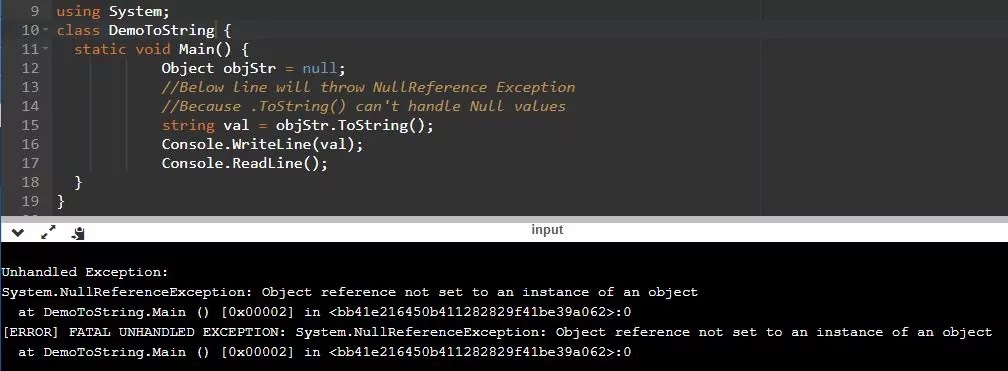
Both methods have the ability to convert a value to a string. The main difference between the two methods is that ToString() method can’t handle Null values, so if you use this method, you will experience a Null Reference Exception in your code at some point in time (as shown below Example). On the other hand Convert.ToString() method can handle Null values. So, as a good coding practice and to be on the safe side, experts recommend always use Convert.ToString() method.

We have used below mentioned examples to demonstrate the difference between ToString and Convert.ToString methods.

.ToString() Example:

In C#, if you declare a string variable and do not assign any value to the variable, the variable takes a null value by default. In this case, if you use the ToString() method, the program will raise a null reference exception.


 using System;

namespace DemoToString
{
    public class Program
    {
        static void Main(string[] args)
        {
            Object objStr = null;
            //Below line will throw NullReference Exception
            //Because .ToString() can't handle Null values
            string val = objStr.ToString(); 
            Console.WriteLine(val);
            Console.ReadLine();
        }
    }
}
tostring-and-convert-tostring

When we run the program it will give us null reference exception because the ToString() method in C# expects that the object cannot be NULL when called on it. In our example, the object objStr is Null, and we call ToString() on the NULL object, so it gives a NULL Reference exception.

Convert.ToString() Example:

Let's see what happens when we utilize the Convert.Tostring() method in the above example. Now, after making the changes, run the program, and it should execute correctly. So to put it plainly, the Convert.ToString() method handles null, and the ToString() method does not deal with Null and tosses an exception.


using System;

namespace DemoConvertToString
{
    public class Program
    {
        static void Main(string[] args)
        {
            Object objStr = null;
            //Below line will Return Null Or Blank
            string val = Convert.ToString(objStr);
            Console.WriteLine(val);
            Console.ReadLine();
        }
    }
}

Convert is a static class in the .Net System namespace, and if you noticed that when you write.ToString() It is in a dark blue color(which means that this method is only available in C#) and Convert.ToString() is in light blue color which means it is global and available in other .Net languages as well.

I will go through the difference between object, var, and dynamic keywords through some examples in my next article. Today, I have tried to explain the difference between .tostring and convert.tostring methods. I trust this article will assist you with your requirements. I hope to receive your feedback. Please post your criticism, questions, or remarks on this article.

Tuesday, 5 January 2016

Error While Importing Excel(2007) "The 'Microsoft.ACE.OLEDB.12.0' Provider is not Registered on the Local Machine"

Yesterday I was in database team with my friend to import an excel file of 3 million records in a table. While importing we got any error message “The 'Microsoft.ACE.OLEDB.12.0' provider is not registered on the local machine”. Here I just want to tell you that we have to do this activity every month and from past 6 months we were doing it successfully until yesterday when we ran into an error “The 'Microsoft.ACE.OLEDB.12.0' provider is not registered on the local machine”.

We were in a hurry so we tried another system to import our file but same error come in front of us and in short span we tried three systems but no success. At last I have researched about this error and got to know that we need to install “2007 Office System Driver: Data Connectivity Components”. So I have installed it from this Microsoft link: Click Here on one of our system and then tried importing the excel file into database table and that's it. Yahooooo it was successful. We've spent a lot of time that is why i have decided to write this post so if anyone ran into this problem will solve it by himself after five minutes of searching on Google.

Hope this article will solve your problem and save your time.

Tuesday, 8 September 2015

Unable to Load DLL 'gsdll32.dll' Ghostscript (Exception from HRESULT: 0x8007007E)

I was working on a project and stuck on this error "Unable to load DLL 'gsdll32.dll'.The specified module could not be found." and you will experience this error when your website/application is consuming Ghostscript gsdll32.dll dll file but unable to locate or load the gsdll32.dll.

Steps To Fix Gsdll32.dll Error:

You should take following steps to resolve the error:
  1. Please first check/verify that ghostscript is installed on your system or not. In my case it exists on below mentioned path: C:\Program Files (x86)\gs\gs8.64\bin\ gsdll32.dll. You will unable to find the "gs" folder if it is not installed on your system.
  2. Download ghostscript dll from ghostscript website and install it on your system. To avoid further error below mentioned are two additional steps just to make sure the error is gone.
  3. Make sure to add reference in your project from the path where this dll exist. In my case it is C:\Program Files (x86)\gs\gs8.64\bin\ gsdll32.dll
  4. In case of any error while adding reference please copy ghostscript "gsdll32.dll" dll from the installation path(in my case it is mentioned above) and paste/place it into your application/website project bin folder.

In this post I have explained the error "Unable to load DLL 'gsdll32.dll': The specified module could not be found. (Exception from HRESULT: 0x8007007E)" and I am sure you will be able to resolve your problem after reading this article. In the next article I will talk about another mind boggling error. In case of any queries or criticism please do write us in the comment section.

Monday, 7 September 2015

Unable to Find an Entry Point Named 'gsapi_new_instance' for DLL 'gsdll32.dll'.

Today I was working on converting pdf files to image with the help of GhostScript and for doing so I have installed GhostScript but when I run my code it was giving me error “Unable to find an entry point named 'gsapi_new_instance' in DLL 'gsdll32.dll'.

How I Resolve GhostScript DLL Error

I’ve search it on internet and found that I have to run “PM> Install-Package GhostScriptSharp” this command in visual studio package manager console and install ghost script sharp package.so I have run this command but even after that error was not resolved. After that I have taken below steps to solve my problem and thought to share with you.
Steps you should take to resolve this error are as follows:
  1. Please first check/verify that pdf ghost script dll is installed on your system or not??
    Path : C:\Program Files (x86)\gs\gs8.64\bin\ gsdll32.dll
  2. Install ghost script sharp on your system if not present.
  3. Add reference to your project from installed path. In my case it was C:\Program Files (x86)\gs\gs8.64\bin\ gsdll32.dll
  4. In case you are unable to add reference or any error occur then copy this dll from insalled path and past it into your project bin folder.
Hope it will resolve your issue.

Thursday, 17 October 2013

COM Class Factory for Component Failed Due to Error 800703fa

In this tutorial I am going to talk about this nasty error "Retrieving the COM class factory for component failed"

Background of the problem is that we've used third party dll in our website to provider interface to clients to pay their bills online. One fine day we've got this strange error in our running application.

Exception Details:-


System.Runtime.InteropServices.COMException: Retrieving the COM class factory for component with CLSID {E973A9DF-8CC6-4A66-802B-39703FD0620B} failed due to the error: 800703fa

After searching a lot from Google I came to know that every body having this problem has his own story that how error comes and how they solved their problem but after reading few ones finally I stopped searching and done a simple thing which solve my problem.I thought I should write on it so may be someone gets help through my writing. Here is my solution in two simple and easy steps:

  1.  Reset your IIS by using iisreset command.
  2.  Register your third party DLL on server again. In my case it was LpiCom_6_0.dll.
If anybody don't know how to register DLL . Please visit my post on how to enable/register dll file.

Hope this tutorial will be helpful for you.

Friday, 8 March 2013

Page Method Or Web Method In ASP.Net | Jquery Ajax() Call

In this article, I’ll talk about what are page methods, and also with the help of an example, we will see how to retrieve data from the database by using Jquery Ajax() method and populate it in a dynamically created HTML table.

What Are Web Methods?

Page Methods or Web Methods are very efficient because neither they need an instance of page nor they require view state to be posted. So point to be noted is that the page method must be static i.e. (static methods can be called without a class instance) because they are independent of page class. Page methods are equivalent to web services.

Example:

In this example, I am going to make a web method "GetPerson()" which will get records from a SQL server table(Person) using Jquery Ajax() method. I am using Microsoft SQL Server. Let's create a table named person and insert some records in it.

sql-person-table


Below is the record in the table.


Jquery Ajax() method allows us to call ASP.NET server-side methods from the client-side without any page refresh or postback.

Jquery code for Default.aspx page :

 
 <script type="text/javascript">
  function retrieveData(){
    // Here goes the ajax method
    $.ajax({
    	type:"POST",
    	url:"Default.aspx/GetRecords ",
    	data:"{}",
    	contentType:"application/json; charset=utf-8",
    	dataType:"json",
    	success:onSuccessData
     });
   
 function onSuccessData(msg){
  var data=msg.d;
  var table="";// dynamically table is created here.
  table+="<table border='1' align='center'>"
  table+="<tr><th>Person ID</th><th>Person Name</th>";
  table+="<th>Person Address</th></tr>";
        if(data.length>0){
        
        for(var i=0; i<data.length;i++){
        	table+="<tr><td>"+data[i].PersonID+"</td>";
        	table+="<td>"+data[i].PersonName+"</td>";
        	table+="<td>"+data[i].PersonAddress+"</td></tr>";
     
        }
       }
        else{
	table+="<tr><td colspan='3' >No Record(s) Found</td></tr>";
        }
         table+="</table>";
        $("#divTable").html(table);
       
        }
    }
    <script>

C# code for Default.aspx.cs page :

First, add necessary namespaces on the page otherwise you will see red squiggly lines under your code.  The method is declared static and writes the keyword [WebMethod] on the top left before starting the method otherwise if you don't write this keyword the client-side Jquery Ajax() method will unable to call this method on the server-side. 

// For database connectivity
using System.Data.SqlClient;
// For defining web method.
using System.Web.Services;
//Because we use List.
using System.Collections.Generic;


    [WebMethod]
    public static List<Person> GetRecords()
    {

        List<Person> p = new List<Person>();
        // Datbase connection string.
        SqlConnection con = 
        new 
        SqlConnection
        (ConfigurationManager.ConnectionStrings["Strng"].ConnectionString);
        // if you want to use stored procedure instead of query
        // then un-comment the below two lines.
        /*  SqlCommand cmd = new SqlCommand("show_Record",con); 
        //"show_Record " is the name of stored procedure.
           cmd.CommandType = CommandType.StoredProcedure;*/

        SqlCommand cmd = new SqlCommand("select * from person", con);
        cmd.CommandType = CommandType.Text;

        con.Open();

        SqlDataReader dr = cmd.ExecuteReader();
        // check if data reader object reads the data and has some rows.
        if (dr.HasRows)
        {
            // read the data untill 0
            while (dr.Read())
            {
                Person per = new Person();
                per.PersonID = Convert.ToInt32(dr["Person_ID"]);
                per.PersonName = dr["Person_Name"].ToString();
                per.PersonAddress = dr["Person_Address"].ToString();
                p.Add(per);

            }
            dr.Close();
            con.Close();


        }
        return p;


    }
}


	public class Person
	{

  	  public int PersonID { get; set; }
  	  public string PersonName { get; set; }
  	  public string PersonAddress { get; set; }

	}
  

And here is the final result on your browser screen:

final-result-of-page-method

Wednesday, 29 August 2012

Difference Between DataAdapter And DataReader

A significant number of programmers have been using DataAdapter and DataReader, but most of them don't have time or they don't pay attention to the distinction between them. Today in this article, we will examine the primary difference between a DataAdapter and a DataReader.

DataAdapter:

The DataAdapter object works as a two-way bridge among the data source and the DataSet object. DataSet is a disconnected data container, and the adapter is responsible for filling data and submitting its data back to a specific data source. From an abstract point of view, a dataadapter is similar to a command/query and represents another way of executing commands against a data source. The biggest difference between commands and data adapters is how they return the retrieved data. The dataadapter accesses the data to obtain the data and packs it into an in-memory container (DataSet or DataTable). The important point about the data adapter is that it is a two-way channel used to read data from the data source to the memory table and write the data in the memory back to the data source.

In Simple Words:

We can read multiple lines. It is the bridge between the database and the DataSet.

It is not always connected to the database. This is a multi-purpose method, we can (read from the database, update to the database)

DataReader:

The DataReader is also used to obtain data from the data source. By using the datareader object, we can read one row at a time. It is the first choice when you need direct data access because it uses a real-time connection. And due to the nature of optimization, its retrieval speed is fast and the performance is the best as compare to DataSet.

Like other ADO.NET objects, each data provider has a datareader class. OleDbDataReader is the datareader class of the OleDb data provider. SqlDataReader and ODBC DataReader are also data reader classes for SQL and ODBC data providers.

The datareader object can only be used to read data forward. When using a datareader object, make sure to open the connection first, and then close the data reader and connection after reading all records. Normally developers use ExecuteReader object to bind data with datareader. Below is the example:

Example:


  Public void BindGridView() {  
    using(SqlConnection conn = new SqlConnection("Data Source=XYZ;Integrated Security=true;Initial Catalog=DemoDB")) {  
        con.Open();  
        string qry = "Select UserName, First Name,LastName FROM Users";
        SqlCommand cmd = new SqlCommand(qry, conn);  
        SqlDataReader sdr = cmd.ExecuteReader();  
        GridViewUser.DataSource = sdr;  
        GridViewUser.DataBind();  
        conn.Close();  
    }  
}
 

In Simple words:

We can read a single row. It uses a live connection. It is read-only and forward only.

I hope that after reading this article, you have understood the difference between DataAdapter and DataReader. In case there is something missing in the article, please do write us in the comment section.

Friday, 24 August 2012

Bind DataGridView From SQl Server Database Table Using C#

In this tutorial I am going to show you how to get value from database and show/bind in in gridview.

Step 1:-

First of all open a new window form project in your visual studio.

Step 2:-


Drag and drop a gridview control into your form and assign it a name for example “personDataGridView”. Also drag a button in your form and assign it a name “personButton”.

Step 3:-


Now just write the below mentioned code in your event handler.


   Private void personButton_click(object sender, Eventargs e){
   SqlConnection con = 
   new SqlConnection ("Type your connection string here"); 
      try
            {
                con.Open();
       }
            catch (SqlException ex)
            {
                throw ex;
            }
     SqlDataAdapter da = 
     new SqlDataAdapter("select * from person, con);
            DataSet dt = new DataSet();
            da.Fill(dt, "person");
            practiceServerGridview.DataSource = dt;
            practiceServerGridview.DataMember = "person";

            con.Close();
     }
   

Tuesday, 21 August 2012

Enable DLL Files From RUN Command

In this tutorial, we will learn what DLL files are,  how DLL files work, and how to enable DLL files when they stop working?

What Are DLL Files?

First of all, DLL stands for Dynamic Link Library, and DLL files are not only very important for Windows OS, but also very important for programs running in OS. These library files contain code used to perform specific functions for applications in the Windows operating system. They are composed of classes, variables, and resources, which may include images, icons and files, and user interfaces.

The DLL file will have a .dll extension. When the application is launched, the operating system will create the necessary links to the DLL files required to run the application. Therefore, a DLL file can provide services for multiple applications at the same time.

DLL File Missing Error

When you launch the application, the system will collect all the essential functions and files required to run the application. Since Windows works on a dynamic model, if some.dll files are missing, the system will display an error message, or sometimes after starting your windows system a message box displays on your screen that some.dll is missing or not located/found in your system. For example maxkernl.dll etc...

How to Enable DLL Files?

Many of the times this pop-up/message box will show on your screen when you install a new application/program and the reason behind this is that whenever you install a software or driver, some of your DLL files stop running/working. You can start them again if you want with the help of the regsvr32 command.

  1. Click on Start or press windows key + d
  2. Click on Run.
  3. Type regsvr32 space and then type your DLL file path including file name.
  4. Press the enter key. 

Note:-

Sometimes you've got an error message/pop up that "unable to load file" or "unable to find the file" or "file not found". In that case, make sure that your DLL is placed in a folder that is properly named. means there should not be any space in the path or name of the folder where the DLL file is placed.

Thursday, 9 August 2012

Fill Combo Box From Database Table Using C# | Sql Server

In this tutorial, I am going to show you how to get data from a database table and fill the combo box.

Step 1:

Add required namespace in your project i.e. using System.Data.SqlClient;

Step 2:

Drag and drop a combo box control into your form and assign any name to it. For example, I have assigned here: “personComboBox”.

Step 3:

Write the below-mentioned code in your event handler.

 SqlConnection con = new SqlConnection ("Type your connection string here");
            try
            {
                con.Open();
            }
            catch (SqlException ex)
           { 
                throw ex; 
            }
 	    SqlDataAdapter da = 
            new SqlDataAdapter ("select person_name from person", con);
            DataSet dt=new DataSet();
            da.Fill(dt);
            personComboBox.DataSource =dt.Tables[0];
            personComboBox.DisplayMember = "person_name";
            con.Close();